Food trucks & market stalls

POS System for Food Trucks & Market Stalls

A food truck has one window, one queue and no room for a till. Piee POS turns the phone or tablet you already carry into the checkout, sends each order to the cook and tells you what the day took when you close. It works beside the card reader you already use: you record how each order was paid.

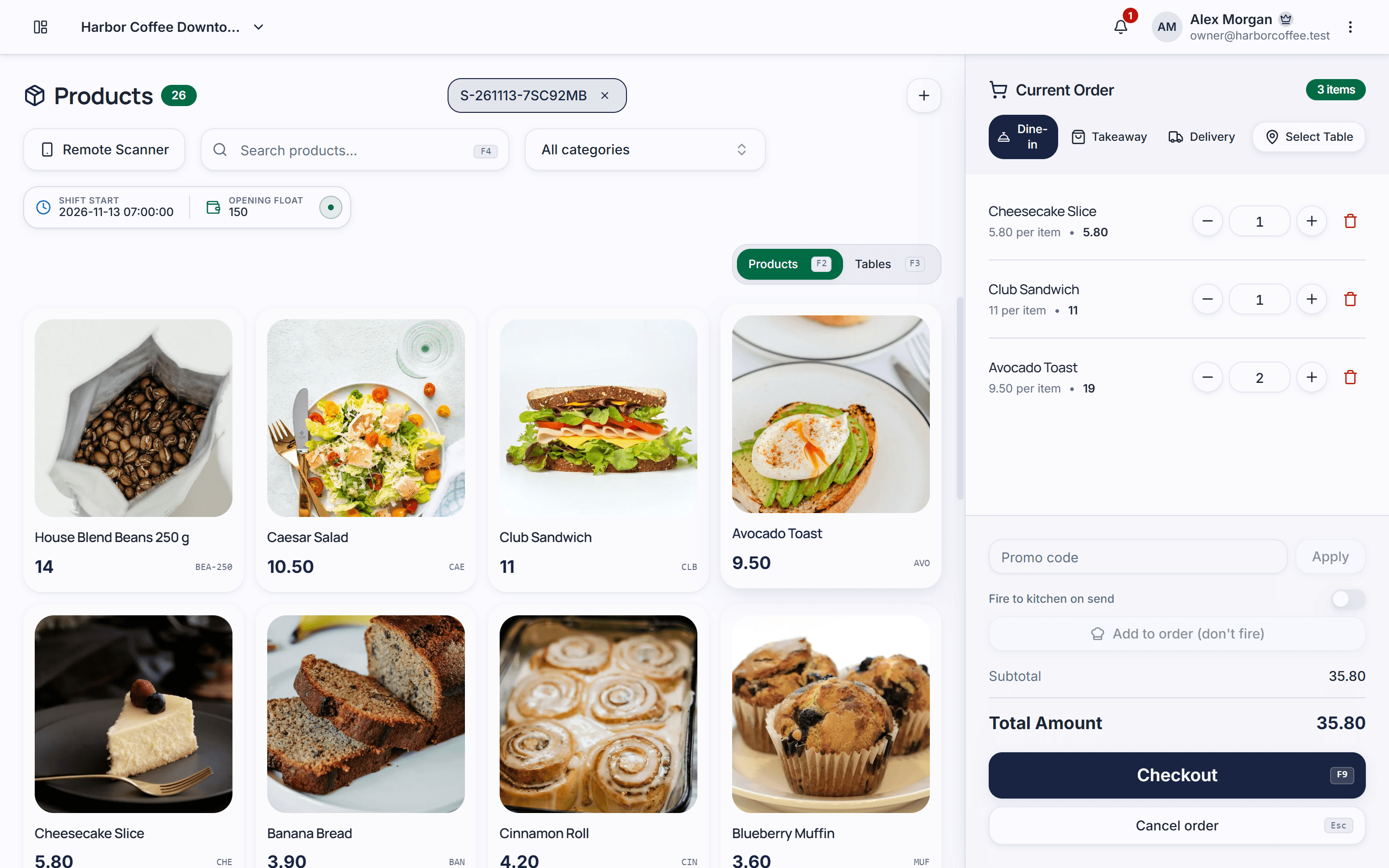
Piee POS: Checkout screen

Sound familiar?

  • The queue gets longer

    A slow checkout at the window costs the customers at the back of the line, who walk off to the next stall.

  • Orders lost between window and grill

    A shouted order or a paper slip gets missed in the heat of service, and the customer waits for food that never comes.

  • The cash box at the end of the night

    Without a count against what was sold, nobody knows whether the cash box is right.

How Piee POS helps

Some features are part of paid plans — see the Pricing page for details.

  • A checkout on your phone or tablet

    Pick items from a grid, build the order and see the total as you go, on the device you already have.

  • Several orders at once

    Park an order while the customer decides and serve the next one; open orders stay as tabs on the screen.

  • Orders to the cook

    Orders appear on a screen by the grill, and each item is ticked off as it is prepared.

  • Keeps taking cash orders when the signal drops

    If the connection drops, the checkout keeps taking cash orders on the device and sends them once the connection is back. Promotions and loyalty points need a connection.

  • A count at closing

    Open the day with a cash float and close it by counting the cash against what was sold.

  • Receipts by QR code

    Once the sale has reached the server, its receipt carries a QR code; the customer scans it and sees the receipt on their phone.

Every feature you need to run your store

Get started in 3 steps

  1. Put your menu in

    Add your dishes and prices; each staff member uses the same menu.

  2. Set up the window and the grill

    Use a phone or tablet at the window and open the kitchen screen on a second device by the grill.

  3. Sell, then close the day

    Take orders, charge them on your own card reader or in cash, and count the cash at closing.

Frequently asked questions

Does Piee POS take card payments?

No. It works beside the card reader you already use: you charge the card on your reader and record the payment in Piee POS. There is no payment-processing contract with us.

What happens when the signal drops?

The checkout keeps taking cash orders on the device and sends them to the server once the connection is back. Promotions and loyalty points need a connection.

Can I run it on my phone?

Yes. Piee POS runs in the browser, on a phone, a tablet or a computer. There is nothing to install.

What does it cost?

You can start on the Free plan, with up to 500 items and 1 location. Paid plans start at $12 a month; see the pricing page for every limit.

Can I run more than one truck?

Yes. Each location has its own stock, shifts and settings under one account. How many locations you can have depends on your plan.

Set up your store today

Create an account, add your products and take your first order. The free plan has no time limit.